InvokeAgent · AI assistant for your business website

When nobody can reply, customers don't wait. InvokeAgent replies for you.

You're in a meeting, driving to a client, travelling or deep in work that can't be interrupted. Meanwhile, someone asks a question on your website. InvokeAgent answers them instantly with your real business information, takes their details or books them in. You don't have to check your phone, and nobody on your team gets overloaded.

  • Ready in about 5 minutes
  • One line of code
  • No contract · from $35/month
  • Routes to your WhatsApp by department
Try an industry:
EmmaNexo Renovations
Online
Type or record a voice note…

You are talking to an AI assistant. Privacy

Works onWordPressWixShopifyWebflowCustom sites EU servers GDPR English and Spanish

Sound familiar?

Your website gets enquiries exactly when you can't look at your phone

This is an ordinary day in a small business. Tap to see the difference.

A company executive in a meeting with her team and a client

10:05 · In a client meeting

New website enquiry: “How much is a bathroom remodel?”

Unanswered · 25 min

Answered instantly. Site visit booked for Thursday at 10:00.

InvokeAgent
A man driving a car

11:40 · Driving to a job site

3 new messages on your website

Unanswered · 40 min

All 3 answered. A hot lead is waiting for you on Telegram.

InvokeAgent
A businessman travelling, by an airport window with his phone in hand

16:20 · Travelling, between two meetings

“Do you cover my area? I need a quote”

Unanswered · 2 h

Answered: yes, you cover it. They left a number for you to call.

InvokeAgent

What it really costs you

Your website brings in customers. The problem is who replies to them.

In a small business, nobody's job is just to answer the website. Whoever could reply is in a meeting, behind the wheel, travelling or busy with something else. And you pay for that in three ways.

The customer who leaves without an answer

They're interested and ask a question just as you walk into a meeting or get in the car. Nobody replies. By the time someone sees it, they've gone quiet. They don't write again, and you never even know you lost them.

An unanswered enquiry never shows up on an invoice. But it's money that never comes in.

The person you hired to do something else

Your office manager, salesperson or technician ends up watching the website chat, inbox and WhatsApp. Every message interrupts what they were doing. By the end of the day their own work isn't finished, and the messages were answered late and in a rush.

Overloading your team isn't saving money. It's paying someone to do two jobs halfway.

Or hiring someone just for this

If you don't have a team, the alternative is paying someone for customer service and lead capture: salary, payroll taxes, training, holidays and sick days. A full-time wage that only covers their working hours.

An assistant that replies from minute one costs from $35 a month.

How much slips away each month?

Calculator
Not answered in time15
Sales at stake$1,200
Staff hours6 h

InvokeAgent Professional

$69/month

Answers every one instantly
and frees up those hours

Rough estimate. "Sales at stake" assumes 1 in 5 unanswered enquiries would have become a customer.

An ordinary Tuesday

James runs the company. Andrew runs the office. Nobody runs the website.

A man focused on his laptop in his office
Focused on his work, with no time to check the website chat.

Without InvokeAgent

  1. Laura asks on the website about redoing her bathroom. James is in a client meeting with his phone on silent.
  2. James is driving to a job site. Three more messages come in and Andrew drops the invoices to answer them as best he can.
  3. James finally sees Laura's message as he leaves the site. He replies at 14:00. Laura doesn't answer.
  4. The invoicing still isn't done, and Laura won't write again. Nobody knows she was lost.
A small business owner smiling in his office
Website messages no longer depend on someone being free.

With InvokeAgent

  1. Laura instantly gets a ballpark price and a site visit for Thursday. James carries on with his meeting.
  2. The other three messages are answered on their own. One wants to talk to a person and gets the sales WhatsApp button. Andrew keeps working.
  3. As he parks, James sees a Telegram alert: appointment booked, hot lead, with a summary of what she needs.
  4. Invoicing done. In the dashboard: 14 conversations, 4 leads and 2 appointments. Nobody had to stop working.

When a customer wants a real person, it sends them to the right WhatsApp

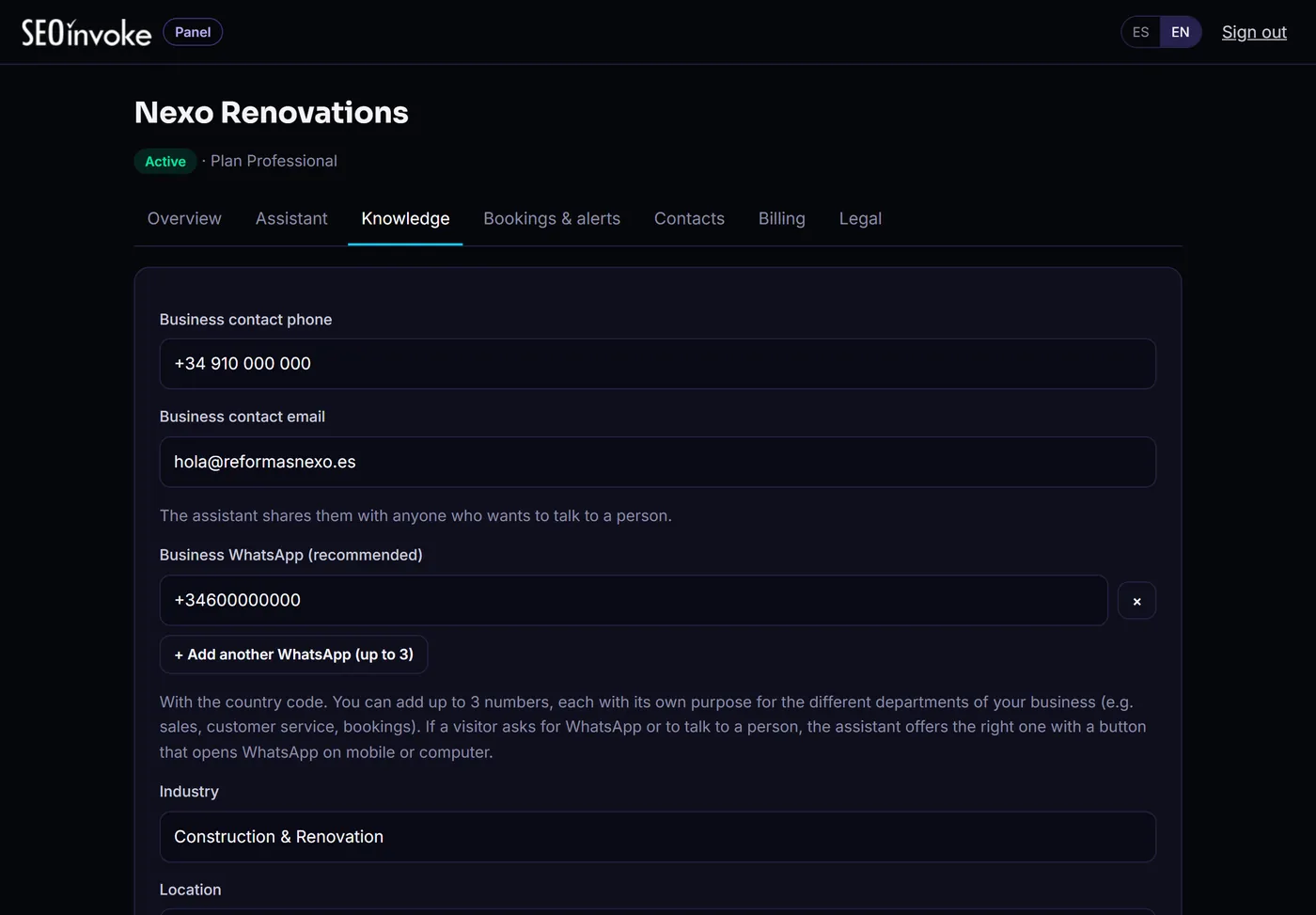
InvokeAgent doesn't replace your WhatsApp, it organises it. You set up to 3 numbers, each with its own role, and the assistant sends every customer to the right department. The conversation reaches the right person, already qualified.

The assistant doesn't reply inside WhatsApp: it routes the customer to your numbers.

How it works

From your website to a working assistant in three steps

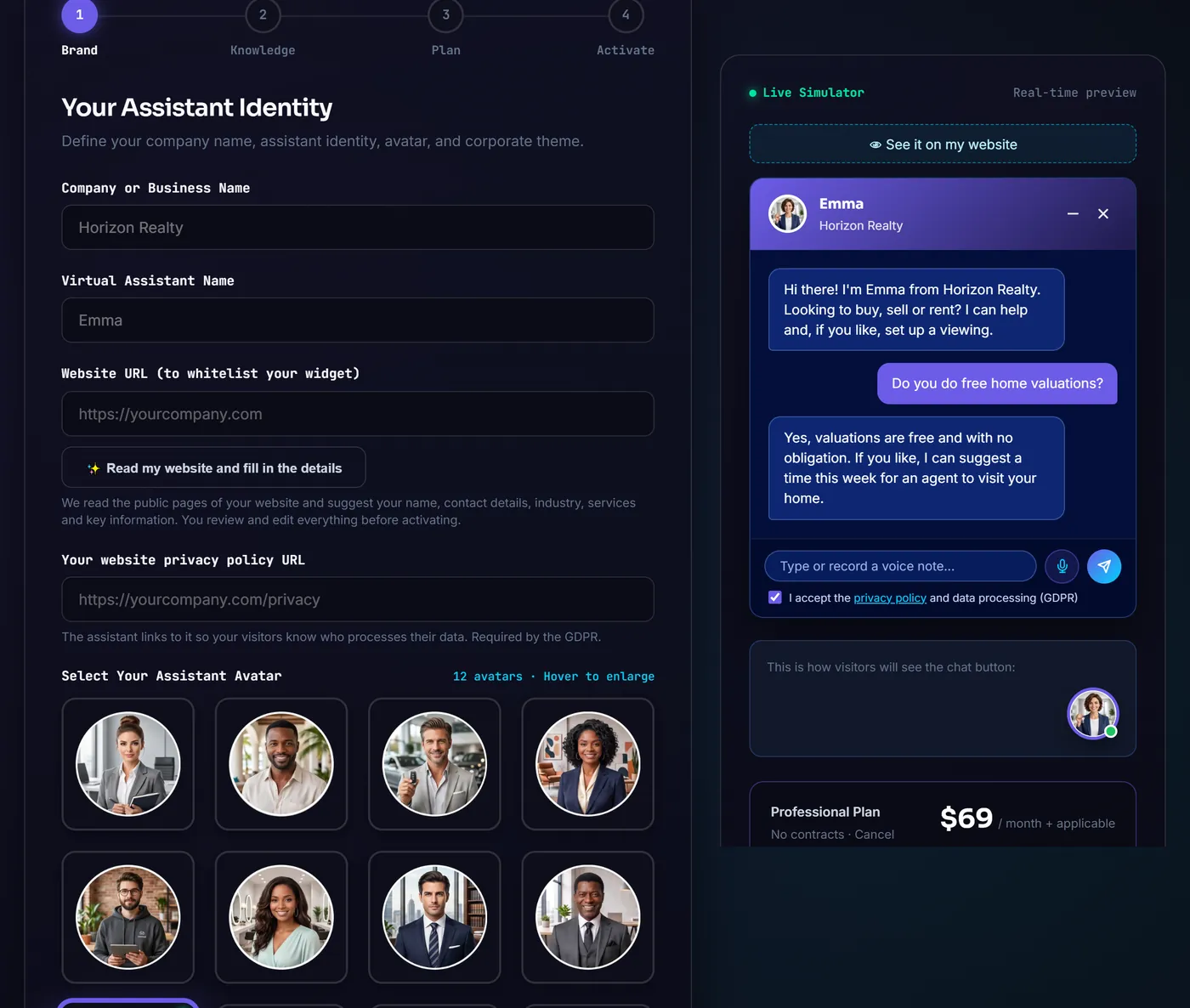
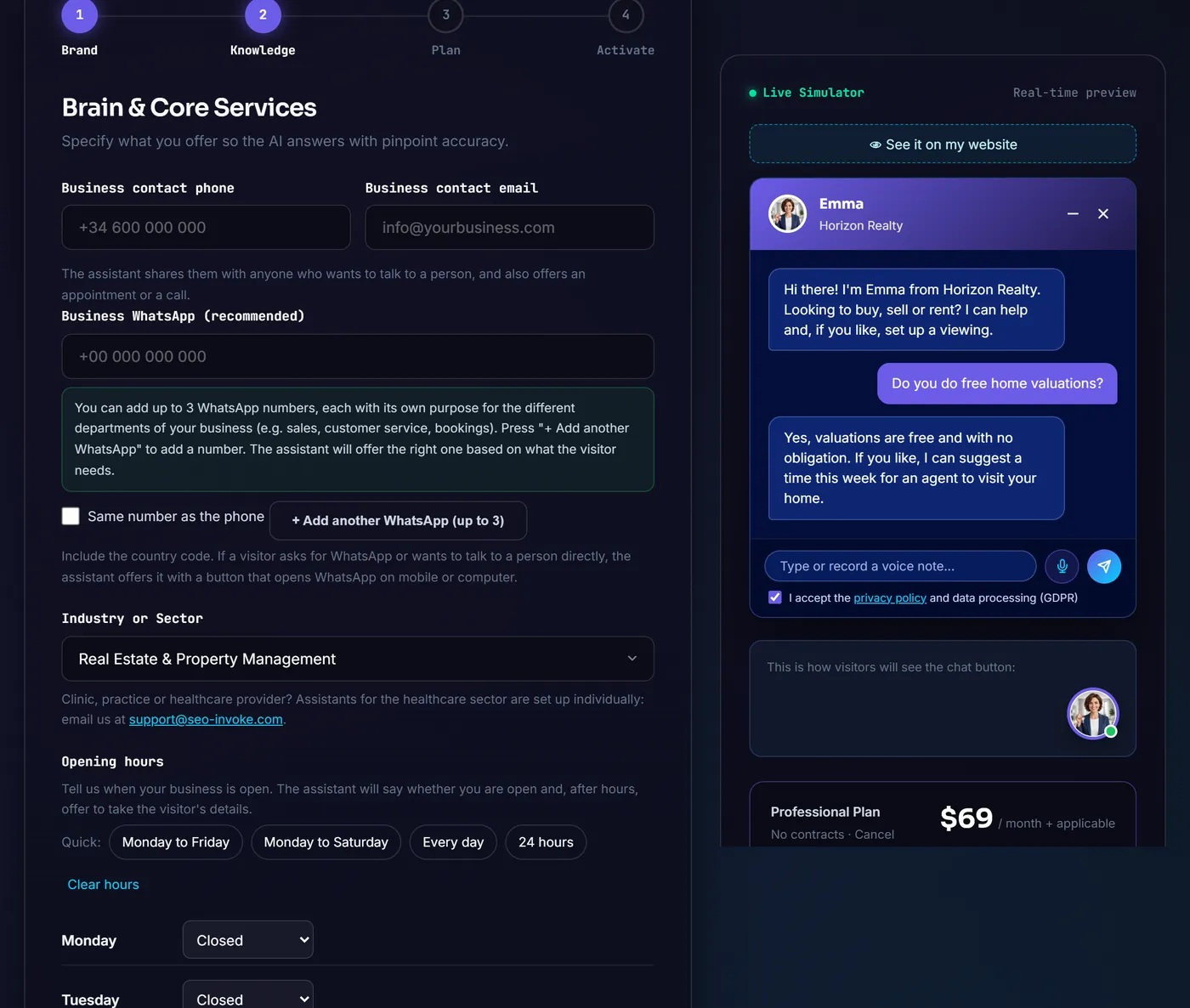
No conversation trees or flows to build. What you see below is the real setup wizard.

agents.seo-invoke.com/en/#configurador

Step 1 of the InvokeAgent setup wizard: assistant identity, Read my website button, avatar gallery and live simulator Step 2 of the setup wizard: contact details, WhatsApp per department, industry and opening hours

Your install code

<script src="https://agents.seo-invoke.com/embed/loader.js"
  data-agent-id="your-business" async></script>
  • Paste it before </body> or into your CMS scripts field.
  • The chat won't break your design: it's isolated from your styles.
  • "Check installation" button in the dashboard.

Your dashboard

See what your assistant does and adjust it whenever you like

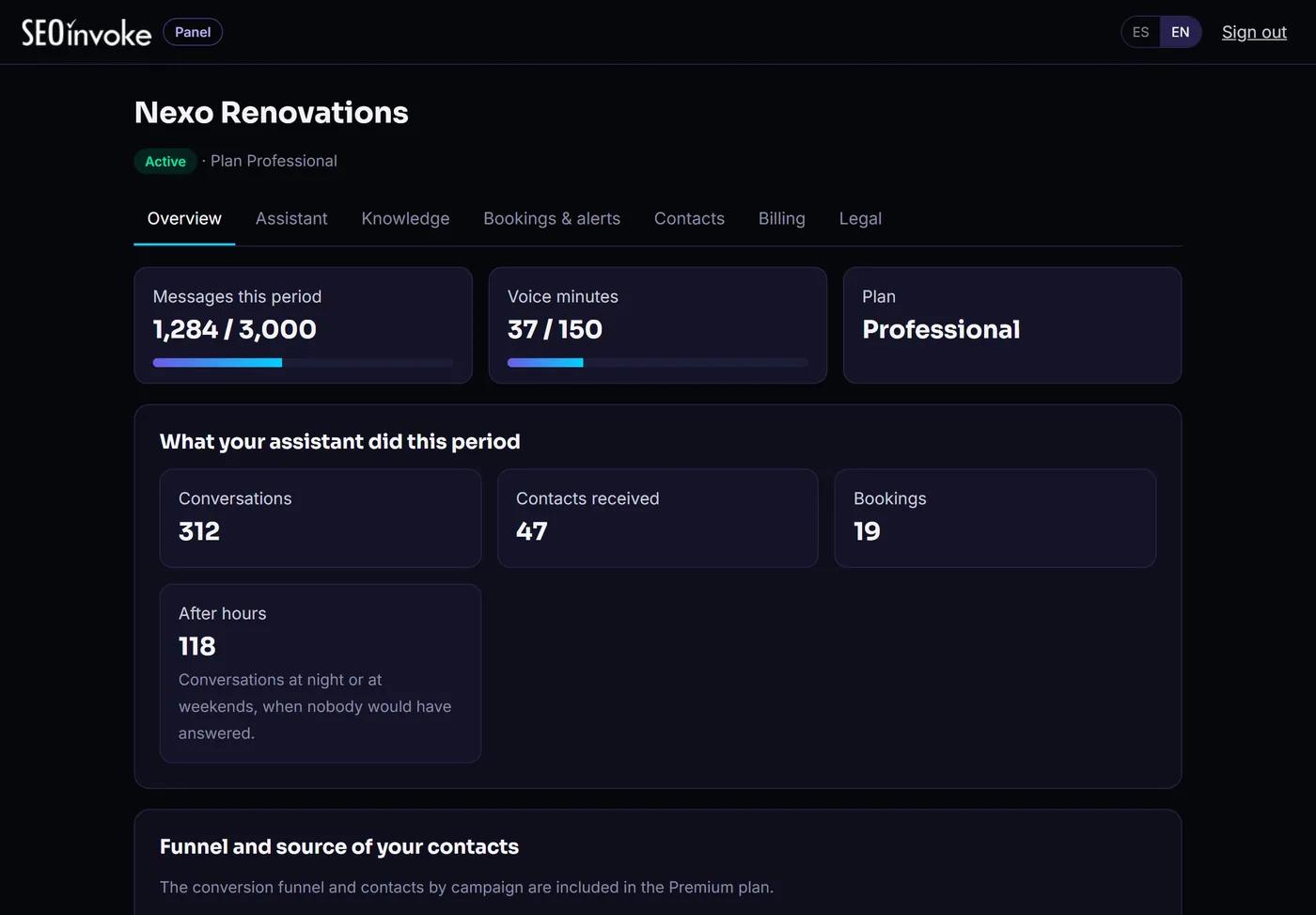
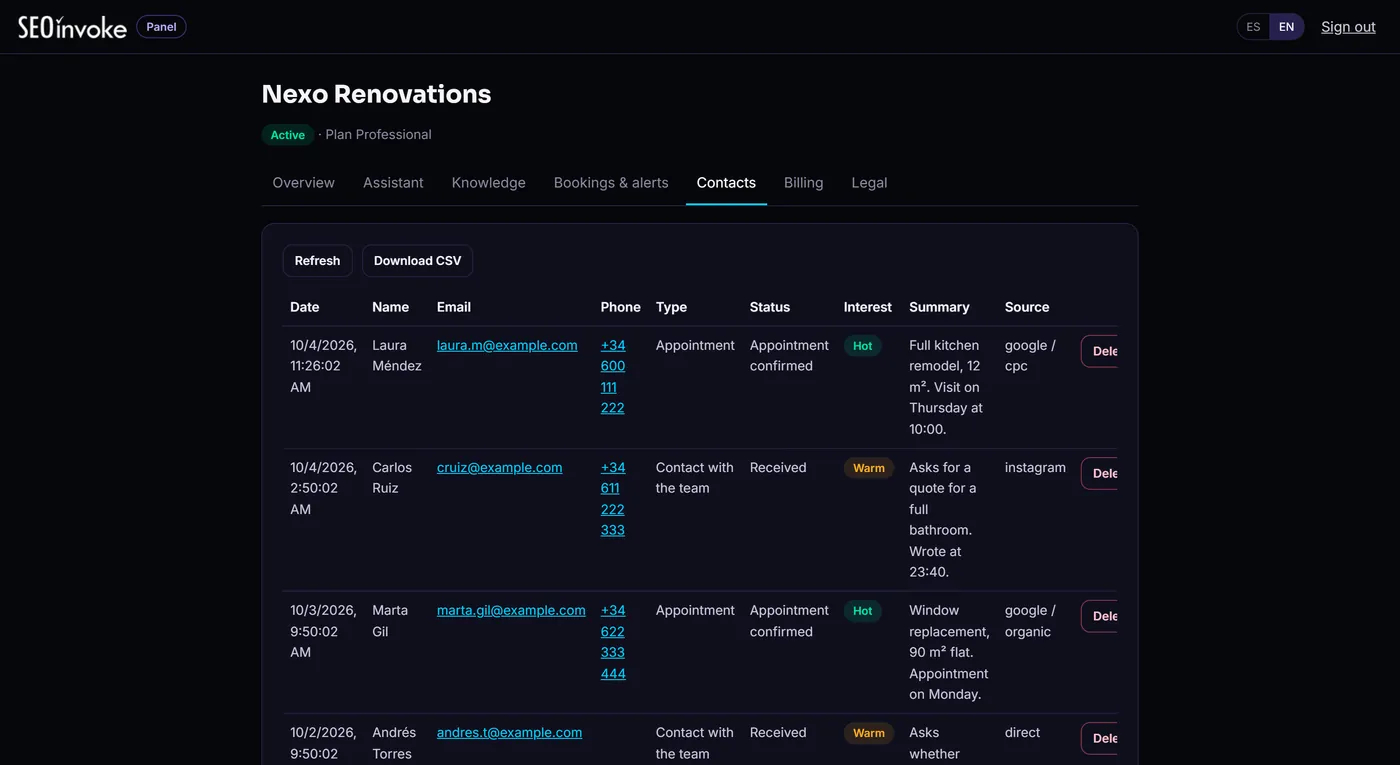
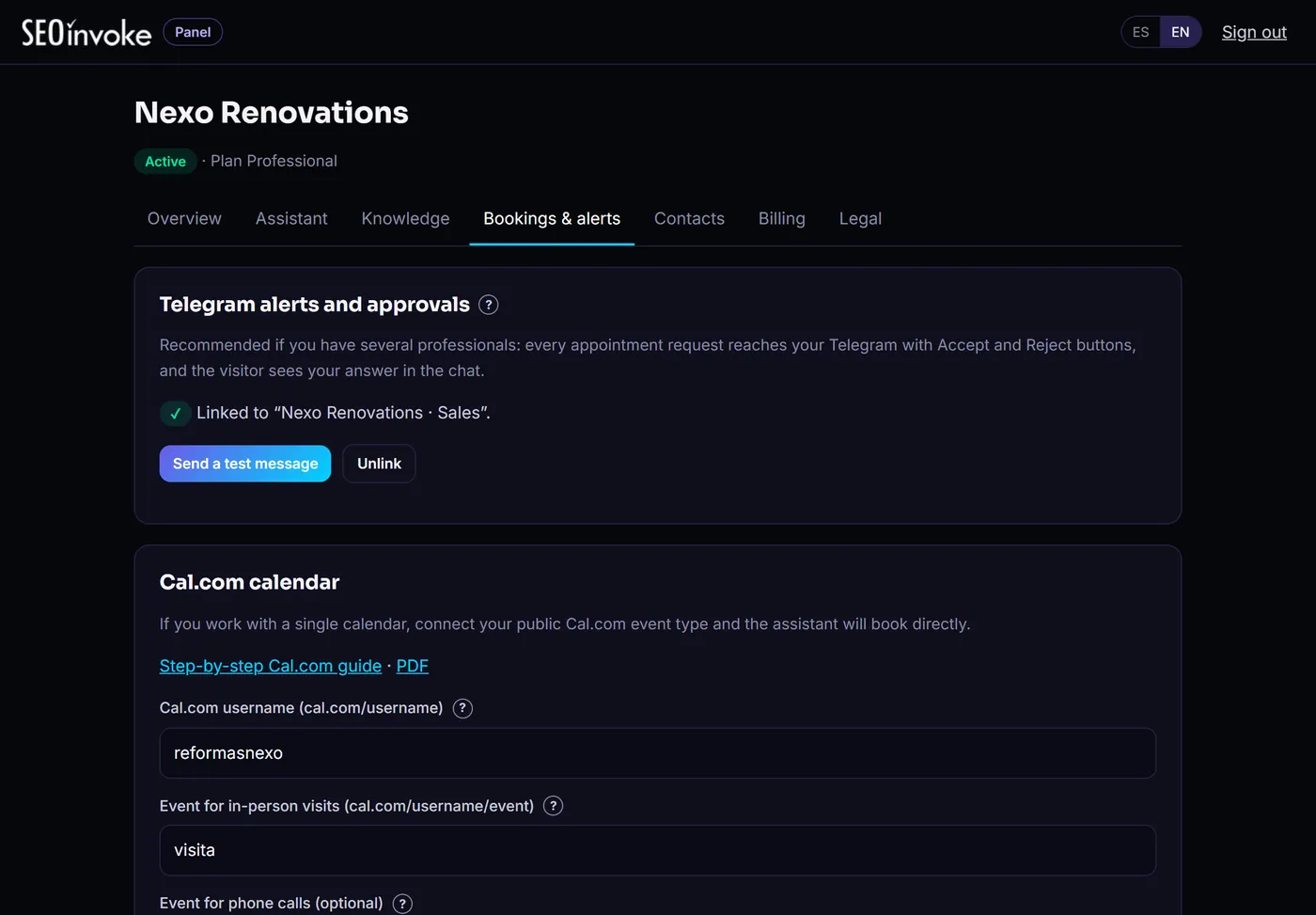
Screenshots of the real dashboard with a sample business. Change answers, services or hours and the assistant applies it straight away.

agents.seo-invoke.com/panel

Dashboard overview: messages used, conversations, contacts, appointments and after-hours conversations Contact list rated hot, warm or cold, with conversation summary and source Bookings and alerts: Telegram linked and Cal.com calendar Knowledge: business phone, email, WhatsApp, industry and location

See how much work it takes off you

Conversations handled, contacts received, appointments booked and how many came in after hours. Every month, no maths required.

Know who to call first

Every contact arrives with a summary of what they need, where they came from (Google, Instagram…) and a rating: hot, warm or cold. Export to CSV or send it to your CRM.

Appointments without phone tag

Connect your Cal.com calendar and the assistant books into your free slots. Prefer to approve each one? It reaches you on Telegram with Accept and Decline buttons.

You decide what it knows and says

Services, ballpark prices, hours, areas, FAQs, documents and rules ("never confirm a price without a visit"). Change it and it applies straight away.


What it does for you

It answers, qualifies and books. Your team only steps in when it's needed.

Answers

With your information, not the internet's

It uses your website, your services and the PDFs you upload (price lists, terms, catalogues). If it doesn't know something, it doesn't make it up: it takes their details so your team can reply.

Knows when you're open

It knows your hours by day. If someone writes while you're closed, it takes their details and has them ready for you.

Handles "do you cover my area?"

It knows where you work and gives your address with a Google Maps link.

Qualifies

Rated leads

Every contact arrives with a summary and a rating by email, Telegram and dashboard. You know who wants to buy and who was just asking.

WhatsApp per department

If a customer wants to talk to a person, it shows the right WhatsApp button: sales, bookings or customer service.

Voice notes

On mobile, visitors can just say what they need. The assistant understands and replies in writing.

Books

Appointments in your calendar

Books into your free Cal.com slots: in-person visits or calls.

Approval on Telegram

If several people take appointments, each request arrives with Accept and Decline. The customer sees your answer in the chat.

Connects to your CRM

Every new contact can also go to your CRM, a spreadsheet, Make, Zapier or n8n.

Let's do the maths

Three ways to handle your website enquiries

The same, in numbers

Cost per month

Dedicated person
a full salary
InvokeAgent
from $35

Hours covered per week

Dedicated person
40 h
InvokeAgent
168 h (24/7)

A dedicated person

A full salary

  • Only during their hours, holidays not covered
  • One conversation at a time
  • Human judgement

Flow-based chatbot

Hours of setup

  • You have to build every question and button
  • If the question isn't in the tree, it's lost
  • Cheap to run

Your best option

InvokeAgent

from $35/month

  • Replies in seconds, many conversations at once
  • Understands questions however they're written
  • Hands your team whatever needs judgement
A small business team meeting a client in the office

Your time, for what matters

You're in the meeting. InvokeAgent is on your website.

While you close a sale, nobody is left without an answer.

Create my assistant

Pricing

Costs less than one lost customer a month

No contract. Change plan or cancel from your dashboard. Applicable taxes are added at checkout.

Essential

To stop answering the basics by hand.

$35/ month

  • 1,000 messages per month
  • 1 website
  • Contacts by email, dashboard and CRM
  • WhatsApp, hours and service areas
  • PDF knowledge documents
Start with Essential

Premium

For several websites and knowing where customers come from.

$119/ month

  • 8,000 messages per month
  • Up to 3 websites
  • Funnel, lead sources and monthly report
  • Voice notes (400 min/month)
  • Everything in Professional
Choose Premium

Rather we set it up for you?

Assisted setup: we configure your assistant with your information, write the answers to your customers' questions and review it with you. One-off payment of $119 ($239 on Premium). Choose it at checkout.

Busy month?

A pack of 1,000 messages for $10, or an extra website for $10/month.

Control and security

It speaks for your business. That's why you're in control.

You test it in the simulator before it goes live. After that, every answer comes from information you've approved.

Knows when it doesn't know

If the answer isn't in your information, it doesn't invent one: it offers to take their details or put them through to your team.

Your rules

Industry templates and your own rules. It also never gives diagnoses or confirms appointments that haven't been booked.

Says it's an AI

The chat always tells visitors they're talking to an assistant, as European rules require.

Data in Europe

EU servers, each business's data kept separate, and a privacy notice included if your site doesn't have a policy yet.

FAQs

What people ask before switching it on

What if someone asks something it doesn't know?

It doesn't make things up. It only answers with your business information (website, services, documents and answers you approve). If it doesn't have the answer, it offers to take their contact details or put them through to your team, and you get an alert.

Does it work with WhatsApp?

Yes, as a bridge. The assistant doesn't reply inside WhatsApp, but when a customer wants to talk to a person it shows them the right WhatsApp button. You can set up to 3 numbers, each with its own role (for example sales, bookings or accounts), and the button opens WhatsApp with a message already written.

Does it replace my team?

No. It takes the website messages that don't need judgement off their plate: ballpark prices, hours, areas, lead times or appointments. Your team keeps the conversations that need a proposal or a decision, and they arrive with a summary.

Do I need to know how to code?

No. Paste your website URL, review what it suggests and copy one line of code into your site. It works on WordPress, Wix, Shopify and custom sites. If you prefer, with assisted setup we get it ready for you.

Can I test it before it goes live?

Yes. The setup wizard has a live simulator, and you can keep testing the assistant from the dashboard afterwards without creating real contacts or appointments.

My website has no privacy policy. Can I still use it?

Yes. During setup you can have us publish a privacy notice with your business as the data controller, and the assistant will link to it.

What happens if I run out of messages?

We email you before you reach the limit. You can add a pack of 1,000 messages for $10 or upgrade your plan from the dashboard, effective immediately.

How does it connect to my calendar?

Through Cal.com, on the Professional and Premium plans. The assistant checks your free slots and books visits or calls. If you'd rather approve each one, it reaches you on Telegram with Accept and Decline buttons.

Is there a minimum contract?

No. Cancel from the dashboard and the service stays active until the end of the period you've paid for.

Does it work for clinics or healthcare providers?

Assistants for healthcare are set up with you, outside the self-service plans. Email us at support@seo-invoke.com and we'll look at it together.

No customer left without an answer. And your team back to their real work.

Set it up from your website, test it in the simulator and publish it with one line of code.

From $35/month · No contract · Taxes added at checkout

From $35/month · No contractCreate my assistant